Resize running boot disk
1. Login to the console and go to the volume you want to edit.
Resize Disk in Console>Edit>Pick size> and let it 'hydrate'
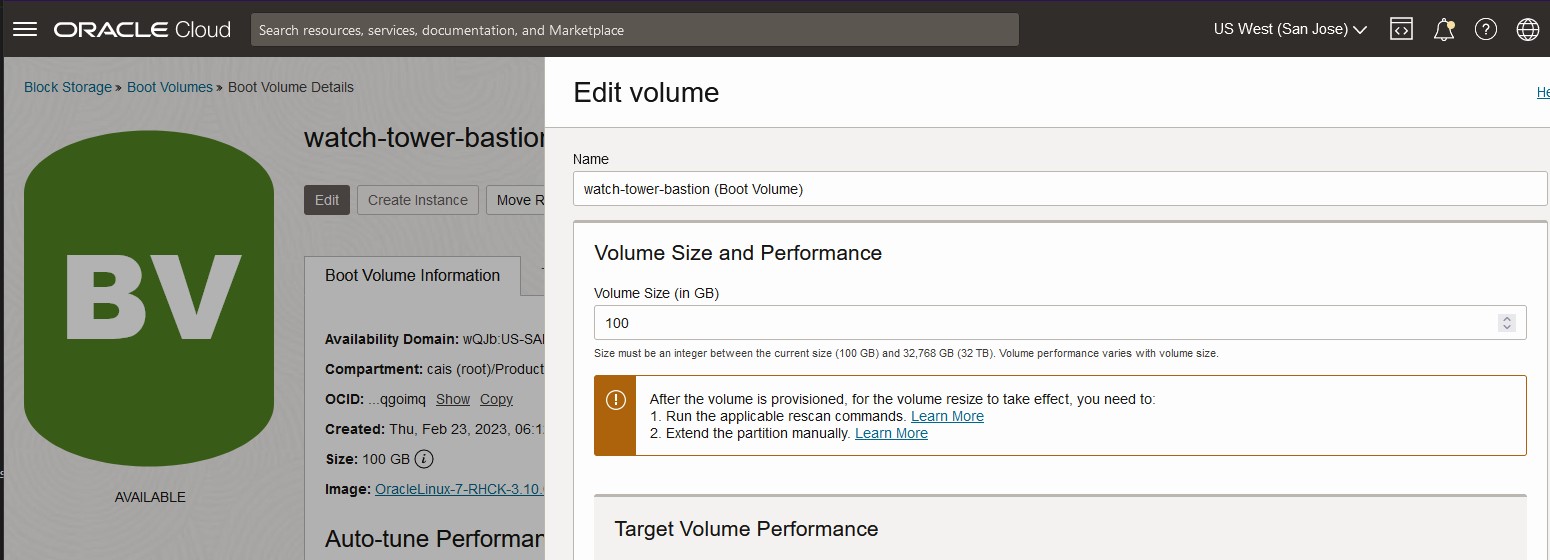
2. Run the commands the dialogue tells you and run the following.
$ sudo dd iflag=direct if=/dev/oracleoci/oraclevda of=/dev/null count=1
1+0 records in
1+0 records out
512 bytes (512 B) copied, 0.000559938 s, 914 kB/s
14:08:27 opc@watch-tower-bastion:.../systemd/system
$ echo "1" | sudo tee /sys/class/block/`readlink /dev/oracleoci/oraclevda | cut -d'/' -f 2`/device/rescan
1
3. Run the oci-growfs command.
$ sudo /usr/libexec/oci-growfs
Mountpoint Data
---------------
          mountpoint: /
              source: /dev/sda3
     filesystem type: xfs
         source size: 41.8G
                type: part
                size: 41.8G
    physical devices: ['/dev/sda3']
    physical volumes: ['/dev/sda']
    partition number: ['3']

Partition dry run expansion "/dev/sda3" succeeded.
CHANGE: partition=3 start=17188864 old: size=87668702 end=104857566 new: size=192526302 end=209715166

Expanding partition /dev/sda3: Confirm?   [y/N] y

Partition expand expansion "/dev/sda3" succeeded.
update-partition set to true
resizing 3 on /dev/sda using resize_sgdisk_gpt
disk=/dev/sda partition=3: original sgdisk info:
Partition GUID code: EBD0A0A2-B9E5-4433-87C0-68B6B72699C7 (Microsoft basic data)
Partition unique GUID: 9412C570-7E1C-42F9-8025-5326EE1A70A3
First sector: 17188864 (at 8.2 GiB)
Last sector: 104857565 (at 50.0 GiB)
Partition size: 87668702 sectors (41.8 GiB)
Attribute flags: 0000000000000000
Partition name: ''
Disk /dev/sda: 209715200 sectors, 100.0 GiB
Logical sector size: 512 bytes
Disk identifier (GUID): 7C3F9529-43D4-4A13-8419-9A6A6EB0038F
Partition table holds up to 128 entries
First usable sector is 34, last usable sector is 104857566
Partitions will be aligned on 2048-sector boundaries
Total free space is 2015 sectors (1007.5 KiB)

Number  Start (sector)    End (sector)  Size       Code  Name
   1            2048          411647   200.0 MiB   EF00  EFI System Partition
   2          411648        17188863   8.0 GiB     8200
   3        17188864       104857565   41.8 GiB    0700
disk=/dev/sda partition=3: pretend sgdisk info
Disk /dev/sda: 209715200 sectors, 100.0 GiB
Logical sector size: 512 bytes
Disk identifier (GUID): 7C3F9529-43D4-4A13-8419-9A6A6EB0038F
Partition table holds up to 128 entries
First usable sector is 34, last usable sector is 209715166
Partitions will be aligned on 2048-sector boundaries
Total free space is 104859615 sectors (50.0 GiB)

Number  Start (sector)    End (sector)  Size       Code  Name
   1            2048          411647   200.0 MiB   EF00  EFI System Partition
   2          411648        17188863   8.0 GiB     8200
   3        17188864       104857565   41.8 GiB    0700
disk=/dev/sda partition=3: pt_start=17188864 pt_end=104857566 pt_size=87668702 pt_max=209715166 last=209715166
disk=/dev/sda partition=3: code=EBD0A0A2-B9E5-4433-87C0-68B6B72699C7 guid=9412C570-7E1C-42F9-8025-5326EE1A70A3 name=''

CHANGED: partition=3 start=17188864 old: size=87668702 end=104857566 new: size=192526302 end=209715166

Resizing filesystem at  / succeeded.
File system xfs on /dev/sda3 extended successfully.